· 8 min read
Static vs dynamic QR Codes
One of them contains your content. The other contains somebody else's link to your content. That single difference decides whether your printed codes still work in three years.
The difference in one sentence
A static QR Code contains your data. A dynamic QR Code contains a short URL belonging to the service that made it, which redirects to your data.
Everything else — the pricing pages, the scan dashboards, the “editable” claims — follows from that one structural fact.
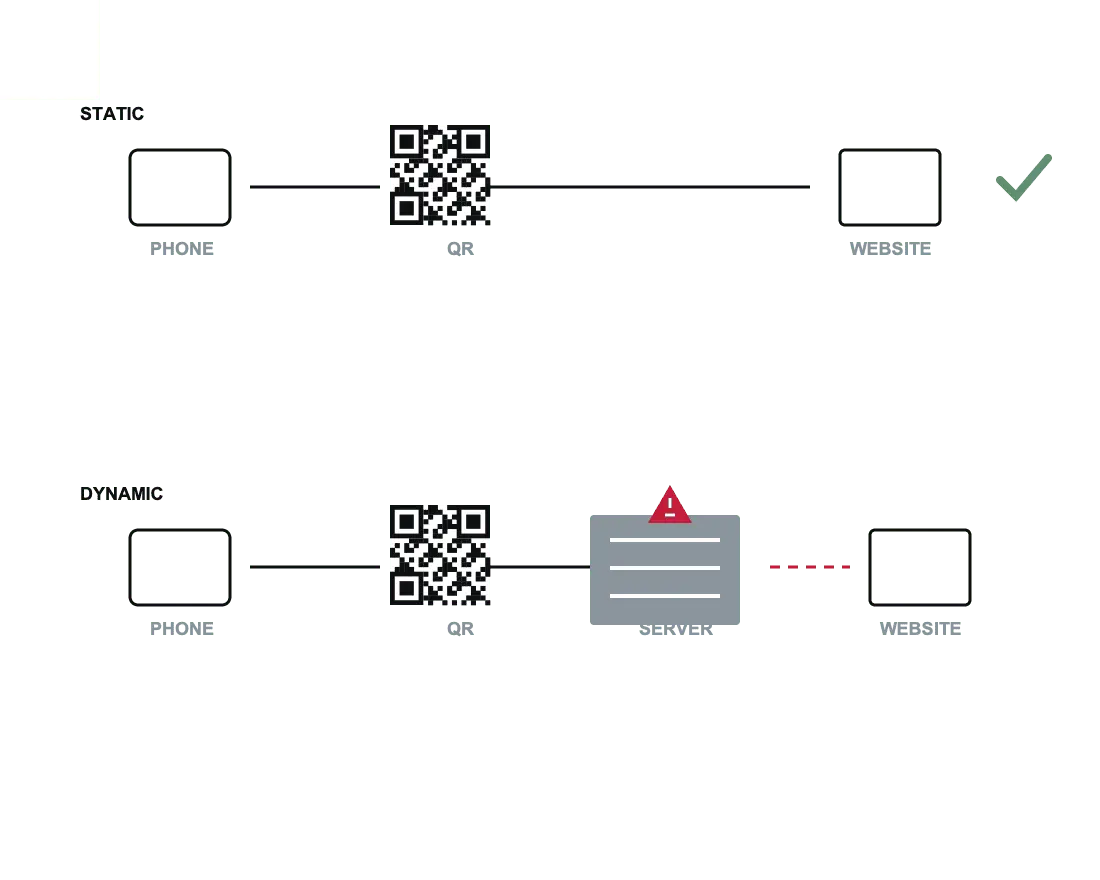
What each one actually contains
Scan a static code for a restaurant menu and the decoded text is:
https://bellavista.example/menu
Scan a dynamic code for the same menu and you get something like:
https://qr1.be/A7X2P
The second one is not your menu. It is a lookup key in a database owned by a company you signed up with once. When someone scans it, their phone asks that company's server where to go, and the server answers. Every scan, forever, depends on that answer still being given.
The four ways a dynamic code dies
- The free trial ends. The most common one. Codes are generated free, printed, distributed — and thirty days later the redirect returns a “this code has expired, upgrade to reactivate” page. The pricing was on the site; nobody read it before ordering five thousand menus.
- A scan limit is reached. Some free tiers cap monthly scans. Your code works all month and dies the week your campaign succeeds.
- The company shuts down or is acquired. QR generators are a crowded market with thin margins. When one folds, every code it ever issued stops resolving at once. This has happened repeatedly.
- The short domain lapses or is blocked. Short-link domains get used for phishing, which gets them onto corporate and mobile-carrier blocklists. Your menu is then unreachable for a subset of people with no explanation anyone can see.
The pattern to watch for
What you give up with a static code
This is the honest accounting, because the trade is real.
| Static | Dynamic | |
|---|---|---|
| Destination editable after printing | No | Yes |
| Scan count and location analytics | No | Yes |
| Depends on a third party | No | Yes |
| Can be switched off by someone else | No | Yes |
| Ongoing cost | None | Usually a subscription |
| Symbol size with a long URL | Larger | Always small |
| Works with no network | For Wi-Fi, vCard, text, events | Never — the redirect needs a connection |
How to get editable destinations anyway
Here is the part most comparison articles leave out: you can have the flexibility without the dependency. Encode a URL on a domain you own, and redirect it yourself.
Print a code containing yoursite.com/menu. Today /menu redirects to
your PDF. Next season it redirects to a new page. In two years it points at an ordering app.
The printed code never changes, because it always said the same thing:
yoursite.com/menu.
Setting that up takes minutes on any hosting you already have:
- Cloudflare Pages or Netlify — one line in a
_redirectsfile. - WordPress — any redirect plugin, or a page that simply moves.
- Apache or nginx — a
Redirectorreturn 301directive. - Shopify, Squarespace, Wix — all have a URL-redirect panel built in.
You keep the editable destination. You keep the server logs, which are better analytics than a scan counter because they tell you what people did after arriving. And nobody can take it away, because the only account involved is the one you already had.
What about the scan count?
A scan counter measures how many people pointed a camera at your poster. Interesting, but not actionable on its own — it cannot tell you whether they read the menu or booked a table.
Tag the URL with campaign parameters instead and your own analytics records the visit
alongside everything else the person did. Use a different utm_source per
placement and you can compare the table tent against the window sign directly. The
UTM QR builder does the tagging; the data lands in your analytics,
where you already look.
What you lose is the count of scans that never reached your site — cancelled taps, phones with no signal. In practice that group is small and it never converted anyway.
When a dynamic code is genuinely the right call
To be fair to the model, there are cases where it earns its keep:
- You cannot host a redirect. No domain, no site, no hosting, and no intention of getting any.
- Thousands of individually tracked codes. Per-item codes on packaging, each needing its own scan record, is a real product requirement.
- Destinations that change weekly by non-technical staff. A dashboard beats a deployment if the person editing is not technical.
- A/B testing the destination itself. Genuinely awkward to do from a static code.
If one of those is you, buy a paid plan from an established provider and read the terms. What nobody should do is print a free dynamic code without knowing it is rented.
A short checklist before you print anything
- Scan your own code and read the decoded text. Is it your URL?
- If it is not, find out who owns that domain and what happens when you stop paying.
- If you want editability, put the redirect on your own domain.
- If you want attribution, add UTM parameters rather than a third-party redirect.
- Check the printed size with the print size checker — a static code holding a long URL needs more room.
FAQ
Frequently asked questions
Can I tell whether a QR Code is static or dynamic by looking at it?
qr1.be/abc or bit.ly/xyz — it is dynamic and runs through that company's server.Are dynamic QR Codes a scam?
How can I change where a printed code points without a dynamic service?
yoursite.com/menu can point anywhere you like, and you can change it as often as you want. You own the domain, the redirect and the logs. The code is still static — it always points at your URL — and you have the flexibility with none of the dependency.Do static QR Codes work offline?
Does a static code hold less data?
Make one now
Every generator on this site produces a static code, in your browser, with no account.