QR Code Print Size Checker
Find out whether your code is big enough to scan before it goes to the printer.
- Free, with no account
- Static — it never expires
- Encoded on your device
Or paste your own content below. Only the length and character set matter.
Nothing is uploaded. It is encoded here to find the real QR version.
Arm's length is about 40 cm. Across a room is 3–4 m. From a passing car, 10 m or more.
Advanced
The specification requires 4.
What is actually encoded
The model, written out
Everything on this page comes from four lines of arithmetic. They are published here so you can check them rather than take our word for it.
- Module grid. A version v symbol is
4v + 17modules across. The version is whatever the encoder chose for your content at your error-correction level. - Total grid. Add the quiet zone on both sides:
total = 4v + 17 + 2q, whereqis 4 by default. - Module size.
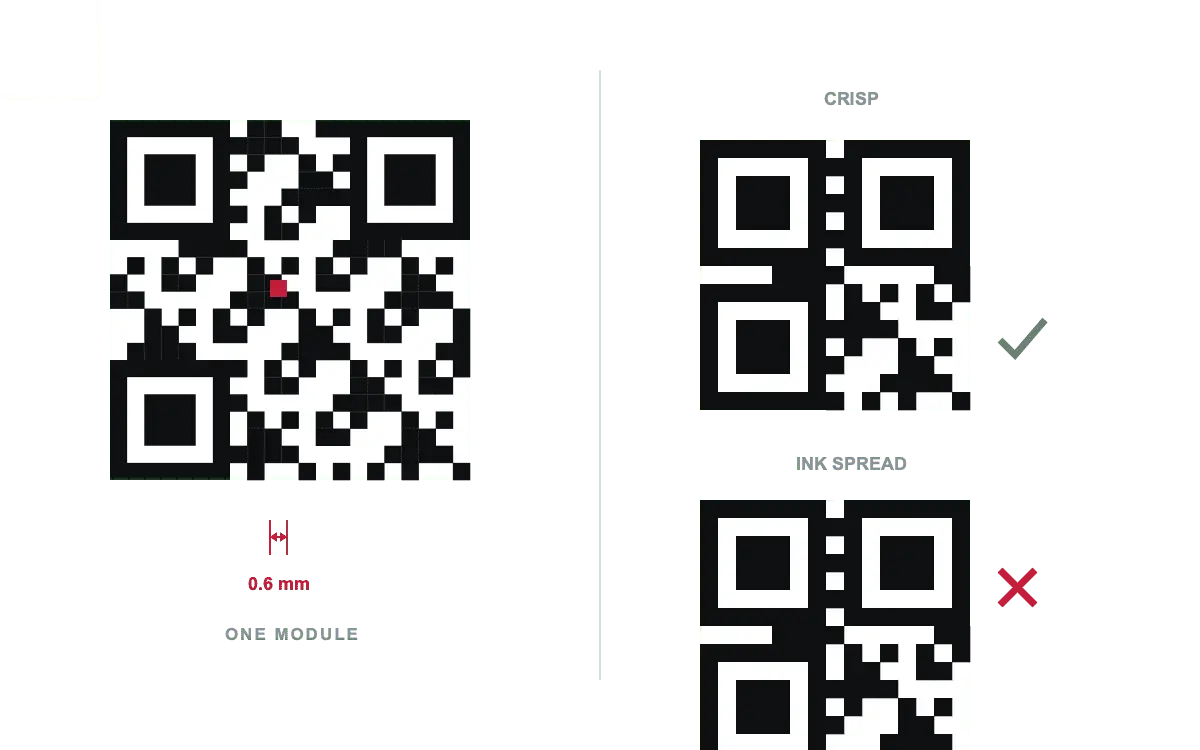
module_mm = printed_width_mm ÷ total. This is the number that decides everything. - Verdict. Compare
module_mmagainst the floor and the comfort threshold for your print method, listed in the table above.
Scan distance uses the 10:1 rule: max_distance ≈ 10 × symbol_width, measured on
the symbol itself rather than the quiet zone. Raster export size is
px = (width_mm ÷ 25.4) × dpi, rounded up so the total grid divides it exactly —
otherwise some modules land one pixel wider than their neighbours and the edges soften.
Why higher error correction can make things worse
It is natural to assume that level H — the one that recovers 30% — is the safe choice for a small printed code. It usually is not. Error-correction codewords are data, and more data means a higher version, and a higher version means more modules squeezed into the same printed square.
A 90-character URL at level M lands around version 6 (41×41). The same URL at level H needs roughly version 9 (53×53). Printed at 25 mm, the modules go from about 1.4 mm to about 1.1 mm — a 20% reduction in the dimension that decides whether the code reads at all. You bought redundancy and paid for it in legibility.
When to raise the level anyway
The quiet zone is not optional
The four-module white border is part of the specification, and it is what lets a decoder find the symbol's edge in a photograph. Designers trim it constantly, because on screen the code still scans and the layout looks tighter. On paper, against a coloured background, at an angle, in poor light, it stops working — and the failure is intermittent, which is the worst kind.
Keep four modules, and keep them the same colour as the code's background. At the sizes in the table above, that is between 2 mm and 5 mm of clear space.
A checklist before the file goes to print
- Module size is at or above the comfort threshold for your print method.
- Quiet zone is four modules, clear of other artwork.
- Dark modules on a light background — never inverted.
- Contrast at 7:1 or better between the two colours.
- Exported as SVG, or as PNG at 300 dpi with a snapped pixel size.
- Scanned from the actual proof, at the actual distance, on at least two different phones.
- Scanned again after lamination or varnish — a gloss finish reflects the flash straight back into the lens.
FAQ
Frequently asked questions
What is the minimum size for a QR Code?
What exactly is a module?
4v + 17 modules on each side — version 1 is 21×21, version 10 is 57×57, version 40 is 177×177. Module size is the printed width of one of those squares, and it is the number that decides whether a code scans.How far away can a QR Code be scanned?
Where do these thresholds come from?
Should I export PNG or SVG for printing?
Does a bigger error-correction level make the code more reliable when printed small?
Keep going